

Emergency Roll Call
Know who is on site.
Account for everyone fast.
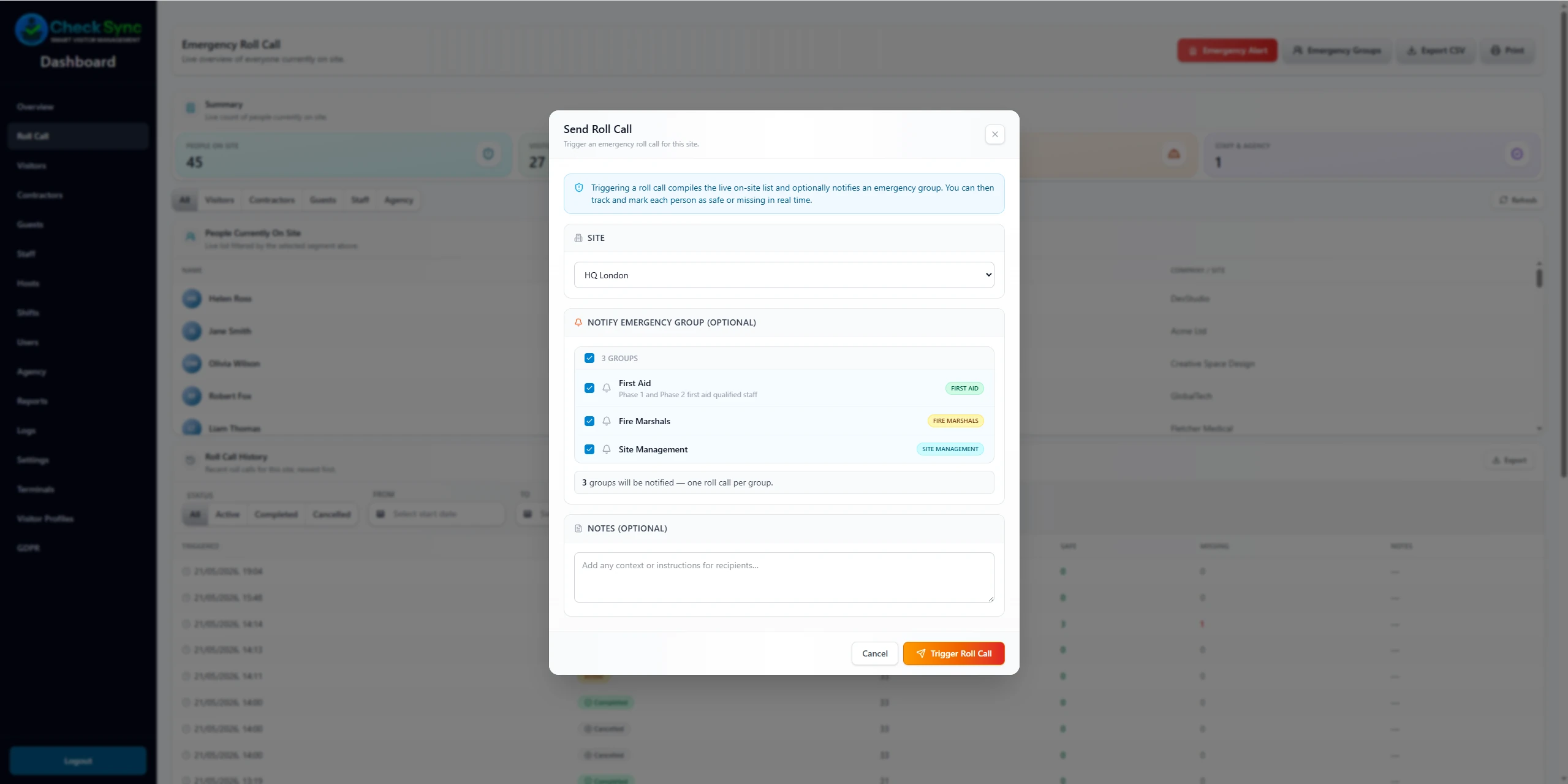
CheckSync helps teams build a real-time emergency picture by showing who is currently signed in and allowing authorised users to trigger, monitor and record roll call activity - directly from the dashboard, in seconds.
Roll call covers all person types configured on site - visitors, contractors, guests, staff and agency workers. No separate system, no manual lists.
Emergency roll call software gives site teams a real-time list of everyone currently signed in (visitors, contractors, staff and agency workers) and lets authorised users mark each person safe, missing or unaccounted during an evacuation. CheckSync triggers a roll call from the dashboard in seconds, notifies designated responders by email with a one-tap acknowledgement link, and retains a timestamped record of every action.
The problem
In an emergency, an inaccurate
headcount puts people at risk.
Most sites have a fire evacuation procedure. Very few have a reliable, real-time record of who is actually on site at the moment the alarm sounds.
Paper sign-in sheets don't reflect live attendance
A sheet filled in at the start of a shift doesn't show who left early, arrived late, or signed out and returned. In an emergency, it gives responders an incomplete picture.
Assembly point headcounts are slow and error-prone
Verbal roll calls at assembly points are time-consuming and unreliable, especially on large sites with multiple contractor teams and high visitor turnover.
Visitors and contractors are frequently missed
Permanent staff may be on a list. Visitors, agency workers and contractors often aren't - or are recorded in a separate system that isn't accessible at the assembly point.
How it works
Trigger, monitor and record
from the dashboard.
Trigger the roll call
An authorised user triggers the emergency roll call from the dashboard. The live on-site list - everyone currently signed in - is immediately available, across all person types and sites.
Notify designated responders
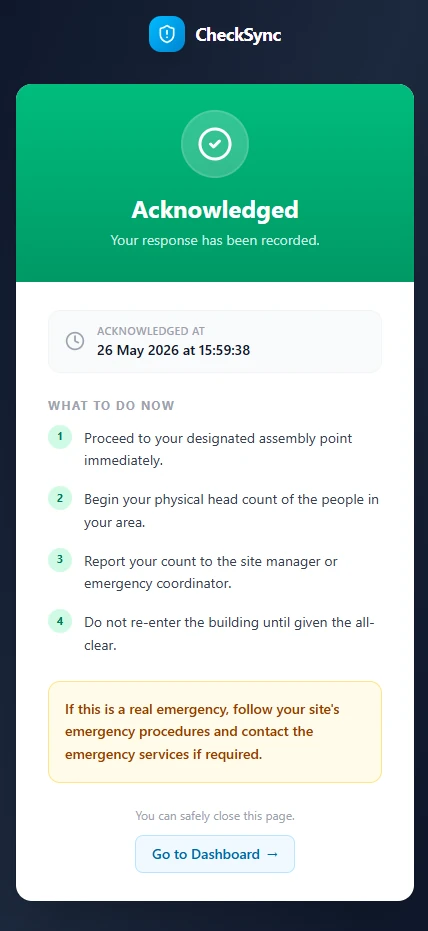
Emergency workflows can notify designated responders by email. Responders can acknowledge from a link without installing an app, accessible on any device at the assembly point.
Mark people safe or unaccounted
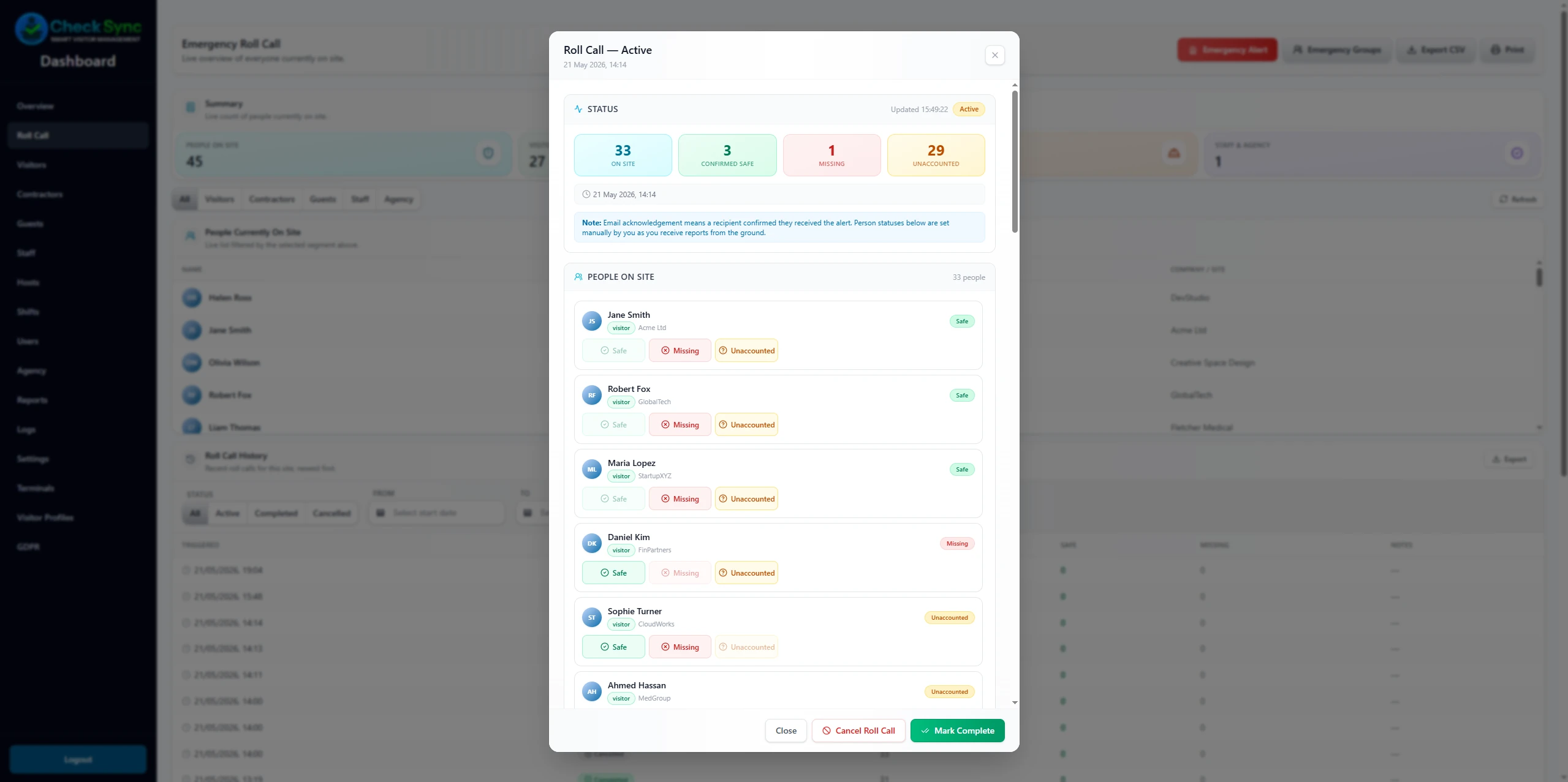
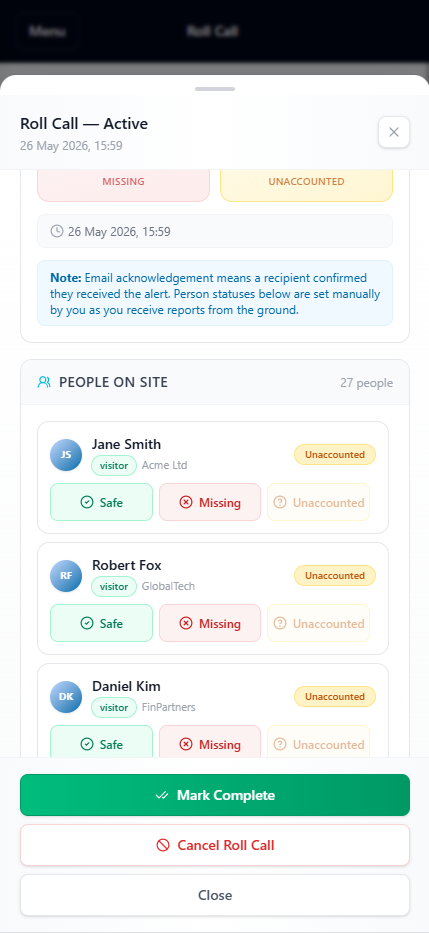
Authorised users mark each person safe, missing or unaccounted directly in the dashboard. The count updates in real time as the roll call progresses.
Record is timestamped and retained
Every roll call action - trigger, acknowledgement, marking - is timestamped and stored in the audit log. The complete record is available for review after the event.
Live roll call
A live count of everyone
on site, right now.
The roll call screen shows everyone currently signed in, across all person types. Responders mark each person safe or unaccounted as the assembly point count progresses.
All person types in one view, no separate systems to check
Real-time count updates as people are marked safe or unaccounted
Mobile-accessible for responders at the assembly point
Complete timestamped record retained in the audit log after the event
Responder access
Acknowledge from any device.
No app required.
Designated responders receive an email notification when a roll call is triggered. They can acknowledge and update the roll call from a link in that email, on any phone or tablet, without installing anything.
Email notification to designated responders on roll call trigger
Acknowledge and mark people safe from a link, no app install needed
Works on any device with a browser at the assembly point
Responder actions are timestamped and included in the audit record
Important to understand
CheckSync supports your emergency procedure.
It does not replace it.
CheckSync provides a real-time digital record of who is signed in and tools to manage a roll call. It is designed to support your site's emergency evacuation procedure — not to replace statutory fire safety obligations, warden responsibilities or legal evacuation requirements.
Roll call data is only as accurate as your sign-in and sign-out compliance on site
CheckSync does not replace fire marshals, evacuation wardens or statutory procedures
Emergency email notifications require connectivity at the time of trigger
Roll call should be used alongside, not instead of, your site's evacuation plan
Who it's for
Get started
See emergency roll call
on your site.
Talk directly to the team behind CheckSync. We'll walk you through how roll call works for your site, person types and emergency procedure.